
VidVast
Rojo GamesVideo Players & Editors
4.67.00 Reviews
- Version
- 1.0.8
- Installs
- 10.00K
- Age Rating
- Everyone
Screenshots
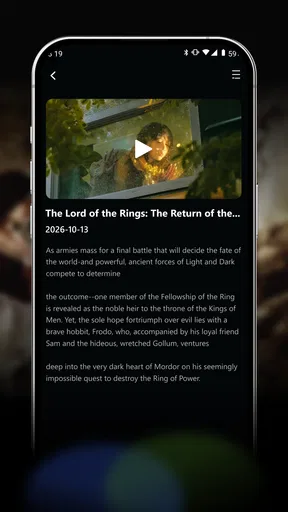
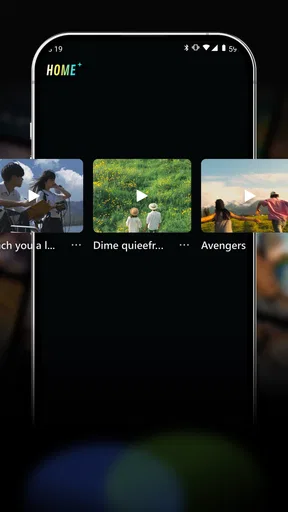
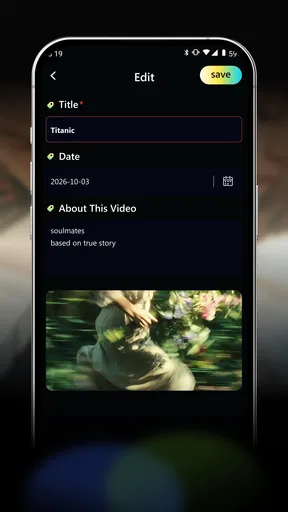
Our Review of VidVast
 Analysis by Appyee
I found VidVast interesting because it takes a very small idea and gives it a calmer purpose: attaching a name, a personal note, and a point in time to each video. It is not presented as a full editing suite or a social video platform. Instead, it belongs to the video players and editors category while focusing on the meaning and context around clips. That makes it feel less like a tool for producing flashy content and more like a private way to remember why a video matters.
After spending time with it, my impression is that VidVast is aimed at people who collect videos for personal reasons rather than people who need a professional production workflow. I can imagine using it for family recordings, short travel moments, reference clips, or videos I want to revisit later without relying on a vague filename. The developer is Rojo Games, and the application is free, which makes it easy to try without turning the decision into a financial commitment.
The important thing is to approach it with the right expectations. Its appeal is in organization and reflection, not in replacing a serious editor, a cloud gallery, or a media-management system with advanced sorting. If you want a quiet layer of personal information around your videos, it has a clear identity. If you expect trimming, effects, captions, or a large professional asset library, you may find the experience too narrow.
Where the first-use experience can become confusing
The most likely point of friction is understanding what VidVast is supposed to do before building a habit around it. The short store description is simply “VidVast,” while its longer message suggests giving each video a name, a note, and a moment in time. That difference matters: the app’s value is not obvious if you open it expecting a conventional editor with a timeline and a collection of visual tools.
I would begin by treating every video as an entry with context, rather than assuming the application will transform the clip itself. A useful name should tell me what I will want to remember later. “Beach” is easy to forget, while “the quiet beach before the storm” gives the clip a stronger identity. The note can then hold the detail that does not belong in the title, such as who was present, what happened just before recording, or why I saved the moment.
The time element is equally important. A video file already has technical information, but a personally meaningful moment may be different from the day the file was copied, edited, or restored. If VidVast lets me associate a moment with the video, I would use that field as a memory cue rather than automatically assuming it should match a file’s creation date. That distinction is especially useful for old clips moved between devices.
The best way to judge VidVast is to test whether its added context helps you find and understand a clip later. That is a more realistic test than asking whether it has the same editing power as a dedicated video application. I would choose a small group of videos with different purposes and see whether the naming, note, and time information make them easier to revisit.
What I would prepare before adding videos
Before starting, I would decide on a simple naming style. Consistency matters more than creativity here. I might use a place followed by an event, or a person followed by a moment. A repeatable pattern prevents the collection from becoming a mixture of jokes, abbreviations, and incomplete labels that only make sense on the day they are written.
I would also keep notes short enough to scan. A note does not need to become a diary entry every time. One or two useful sentences can be more valuable than a long description because the purpose is to recover the memory quickly. For a reference clip, I might record what the clip demonstrates and what I need to check. For a family clip, I might capture the small detail that the video itself does not show.
There is a practical trade-off here. Adding context takes longer than leaving a video in a standard gallery, so VidVast is most rewarding when I apply it selectively. I would not label every disposable recording. I would reserve the effort for clips I expect to search for, share privately, study again, or remember years later.
Setup checks that prevent avoidable frustration
VidVast runs on Android versions from 8.0 onward, so compatibility should be checked before troubleshooting anything else. If the application does not install or behaves unexpectedly, confirming the device software is a sensible first step. This is especially relevant on older phones, where storage pressure and outdated system components can affect media handling even when an app itself is installed correctly.
I would then make sure the chosen video is actually available on the device rather than only visible through a separate cloud gallery. A thumbnail in one application does not always mean that another application can immediately open the original file. If a clip is stored remotely, partially synchronized, or located on removable storage, I would first confirm that it can play normally in the phone’s regular video viewer.
Storage is another simple check. A phone that is nearly full can produce confusing symptoms: a media item may appear late, a change may not seem to stick, or the application may feel unresponsive while the system is trying to process the file. I would free some space, close unrelated applications, and reopen VidVast before assuming that the app has lost information.
The same principle applies to selecting a test clip. I would start with a short, ordinary video that already plays correctly on the device. That creates a clean baseline. Beginning with a very large file, an unusual format, or a video on an external location makes it harder to tell whether the issue comes from VidVast, the file, or the phone’s media framework.
Because VidVast is free and rated for Everyone, it is approachable for casual users and families. Still, an age rating does not explain a workflow, so I would keep the first session deliberately simple: open one known-good clip, add a clear name, write a brief note, choose the relevant time, and then leave and return to that entry. This small cycle tells me more than trying to organize an entire library immediately.
A reliable first-session routine
Choose one video that plays normally in another player on the same device.
Give it a descriptive name that would still make sense months from now.
Add a note containing information that cannot be seen from the image alone.
Use the time field deliberately, distinguishing the meaningful moment from a later copy or edit.
Return to the entry and check whether the information remains clear and useful.
This routine also reveals whether my own organization style is the problem. If I cannot decide what belongs in the title and what belongs in the note, the collection may become inconsistent regardless of the application. VidVast works best when I treat those fields as separate jobs: the name identifies, the note explains, and the time anchors the memory.
Recovering a workflow when something does not look right
If a video does not appear as expected, I would avoid making several changes at once. First, I would close and reopen the app, then check the same clip in the phone’s normal player. If it fails there too, the file or device is the more likely source of the problem. If it plays elsewhere but not in VidVast, I would try a different local clip to see whether the behavior is specific to that item.
I would also avoid repeatedly editing the same entry while uncertain whether a previous change was saved. A calmer recovery method is to pause, reopen the relevant screen, and inspect the name, note, and time separately. This makes it easier to identify whether the issue concerns the video itself or only one piece of associated information.
When working with a copied or moved video, I would verify that I am using the intended version. Phones often contain several similar clips: an original recording, a trimmed copy, a downloaded version, and a file received through messaging. If the wrong clip is selected, the information may appear incorrect even though VidVast is handling the chosen file consistently.
For a large personal collection, I would not attempt a complete migration in one sitting. I would create a small, meaningful batch and establish a naming pattern first. This is one of the less obvious strengths of a focused app like VidVast: it encourages deliberate curation. The weakness is that deliberate curation can feel slow if I approach it like a mass-import project.
How I would use it in everyday life
Imagine returning from a weekend trip with several short videos. In a normal gallery, the clips may be arranged by file date, but that does not tell me which one shows the early walk, the unexpected weather, or the conversation I want to remember. In VidVast, I could give each selected clip a meaningful name, add a note about what made it worth keeping, and attach the moment that matters to me. Later, the collection would carry a little of the story that the raw files cannot provide.
Another useful scenario is learning. I might record a short demonstration of a repair, a cooking technique, or a pronunciation exercise. The title can identify the subject, while the note can record the mistake I made or the detail I need to repeat. The time marker can help me place the clip in a study sequence. This is more practical than saving a video with an automatic filename and hoping I remember its purpose.
I can also see value for people who keep personal video journals but do not want a public social platform. The app’s quiet positioning suits private reflection. A short note can preserve the feeling behind a clip without requiring a polished caption or public audience. That said, anyone who needs automatic backup, collaborative access, or a broad family-sharing system should compare VidVast with a gallery or cloud service designed specifically for those responsibilities.
When the application is not the cause
Media problems are often blamed on the newest app in the chain, but the surrounding system can be responsible. A damaged file, an unsupported format, a disconnected storage location, or a phone that is low on space can all look like an application failure. My first diagnostic question would be simple: does the same video behave normally elsewhere on the device?
File identity can also create misleading results. If I rename a video outside VidVast, move it to another folder, or replace it with a new copy, I may no longer be working with the item I originally organized. A careful workflow means making one change at a time and checking the result before continuing. This is not exciting advice, but it prevents a lot of unnecessary rework.
Device performance deserves attention too. Older hardware may take longer to display media or respond when several applications are open. Since VidVast supports Android 8.0 and later, the range of possible devices is broad. I would judge responsiveness in the context of the phone, available storage, and the size and location of the video rather than expecting identical behavior on every compatible device.
If the issue continues with several ordinary local videos that play correctly in other players, I would record the exact steps, the device software version, and the affected file type before seeking help. Clear reproduction steps are more useful than simply reporting that “videos do not work.” They also help separate a repeatable app issue from a one-off file problem.
How it compares with familiar alternatives
A standard phone gallery is faster for browsing everything at once and usually fits into an existing photo-management habit. It is the better choice when automatic grouping, quick sharing, or broad device integration matters more than personal annotations. VidVast becomes more appealing when I want to make selected videos understandable on their own, without depending entirely on filenames or chronological order.
A full video editor is the obvious alternative for cutting footage, combining scenes, changing sound, or adding visual effects. VidVast should not be chosen for those tasks. Its value lies before or after editing: I can use it to preserve the reason a clip matters, while a dedicated editor handles the actual production work.
A cloud photo service may be stronger for synchronization and access across devices, especially for people who switch phones often. VidVast is more focused and personal in concept. The trade-off is that a focused video-context tool may require more intentional organization from me, while a cloud gallery may automatically handle much of the library structure.
That comparison helped me place the app accurately. It is not trying to win by offering the longest feature list. It is useful when the problem is not “how do I edit this video?” but “how will I remember what this video is and why I kept it?”
Who will get the most from it
I would recommend VidVast to people who save meaningful clips, keep small research libraries, or want a more thoughtful way to revisit personal recordings. It is also suitable for users who prefer a straightforward free tool and do not want to build a public profile around their videos. The Everyone rating makes it accessible in terms of audience, while the simple concept keeps the learning curve manageable once the purpose is understood.
I would be more cautious about recommending it to professional creators, social-media editors, or anyone managing a large production archive. Those users normally need powerful search, batch operations, export controls, collaboration, or detailed media metadata. VidVast’s focused approach may feel restrictive in that environment, even if its annotation idea is appealing.
It may also be the wrong choice for someone who wants zero maintenance. The app’s benefit depends on the quality of the names, notes, and time choices I provide. If I never add context, it cannot create that meaning for me. A regular gallery with automatic organization may be more convenient for a purely passive collection.
What the current release suggests about maturity
VidVast is at version 1.0.8, with an average rating of 4.6 from around 348 ratings and over 10K installs. Those figures suggest a small but positive early audience rather than a long-established mass-market platform. I would interpret that as a reason to appreciate its focused concept while keeping expectations realistic about how broadly tested it may be across different devices and media libraries.
The application was released on May 28, 2026, so its identity still feels relatively fresh. That can be good for users who enjoy trying a purpose-built idea before it becomes crowded with unrelated features. It also means I would keep my workflow organized and avoid treating it as the only place where irreplaceable videos exist. Important originals should remain safely stored through whatever backup method I already trust.
My overall view is positive, but specific. VidVast is not impressive because it promises to do everything with video; it is useful because it gives selected clips a human explanation. The strongest result comes from using it as a curated memory and reference layer, not as a replacement for editing software, a gallery, or backup storage.
After testing the concept in practical situations, I would keep it for videos that deserve more than an automatic filename. I would start with a small collection, use consistent titles, write notes that add information rather than repeat the image, and choose times with care. If that sounds like the kind of organization you have been missing, VidVast is worth trying as a free, personal video companion. If your priority is advanced editing, automatic cloud management, or professional media handling, a more specialized alternative will serve you better.
For me, the final appeal is its restraint. The app encourages me to slow down and decide what a clip means before moving on to the next one. That will not suit everyone, and it does introduce a little manual effort, but for personal videos that effort can be exactly what turns an anonymous file into something I can recognize and value later.
Verdict
Strengths of VidVast
- Supports offline viewing for convenient playback without a constant connection.
- Offers personalized recommendations that help users discover new videos.
- Includes adjustable playback controls for different viewing preferences.
- Works well on both phones and tablets with a clean, accessible interface.
- Regular content updates keep the catalog feeling fresh and engaging.
Limitations of VidVast
- Some videos may be unavailable depending on your country or region.
- The free experience may include frequent advertisements during playback.
- High-quality streaming can consume significant mobile data and battery.
- Search results may occasionally include irrelevant or repeated content.
- Certain features or content may require a premium subscription.
Similar Picks in This Category
View All
Google TV
Google LLC3.9

iTunes
Apple4.7

YouTube
Google LLC3.8

MX Player
Amazon Mobile LLC4.2

CapCut - Video Editor
Bytedance Pte. Ltd.3.5

PLAYit-All in One Video Player
PLAYIT TECHNOLOGY PTE. LTD.4.5
Frequently Asked Questions
What is VidVast and what can I use it for?
VidVast is a video-focused application designed for discovering, watching, and organizing online video content from a mobile device. Its exact features may vary depending on the version and platform, but users can generally expect a browsing experience built around video recommendations, categories, search, and playback. Before downloading, check the current store description to confirm which content sources and functions are supported in your region.
Is VidVast free to download and use?
VidVast may be available as a free download, although some features can depend on advertising, optional purchases, subscriptions, or restrictions imposed by the content provider. I recommend reviewing the app’s pricing details in Google Play or the App Store before installing it. Also check whether a subscription renews automatically, what it includes, and whether free users receive the same playback and browsing options.
Does VidVast require an account or personal information?
The need for an account can depend on the features you want to use. Basic browsing or video playback may be available without registration, while saving favorites, synchronizing preferences, commenting, or receiving personalized recommendations could require sign-in. Before creating an account, read VidVast’s privacy policy and permissions carefully, especially if the app requests access to contacts, location, storage, or other information unrelated to video viewing.
Can I watch videos offline or use VidVast without an internet connection?
Offline viewing is not guaranteed and depends on whether VidVast officially supports downloads for the specific videos you want to watch. Many video applications allow streaming only and require a stable Wi-Fi or mobile-data connection. If downloading is offered, review the storage requirements, download limitations, expiration rules, and whether saved videos can be played only inside the app. Avoid unofficial download methods that may violate content rights.
Is VidVast safe and compatible with my Android or iPhone?
Before installing VidVast, confirm that you are downloading the official version from Google Play or Apple’s App Store rather than an unknown third-party website. Check the listed developer, recent reviews, update history, required permissions, and minimum operating-system version. Performance can vary by device, network quality, and app release. If privacy, advertisements, or regional availability matter to you, review those details before granting permissions or signing in.
